The other night I wanted to implement a small Voronoi-diagram shader to use as a background to a music video, to show up the music project I recently finished. Voronoi Noise is type of algorithm I never implemented before, and I was always mesmerized by the geometric and often organic-ish way it looks. Without much direction in mind, I started implementing it and experimenting. I got it looking pretty cool and I was about to call it a day, but then next morning I found out that, in one of my computers only, there was a weird stutter to the animation. So I decided to dig into it to find out what the problem was. This is the write-up of my whole adventure of a week debugging and disassemblying shaders. There are a few plot twists to the story, and hopefully a lot of interesting information too.
This is the final shader. You can also check it on Shadertoy. I still haven’t worked on the video, but you can check the music on all digital platforms: stuffy knows.
The Shader
This shader is not too complicated. In fact, it’s basically just a few concepts put together:
Voronoi Diagram
A variation of what’s called a Worley Noise, or a Voronoi Noise, that makes the cells distinct between themselves. In this case, I divide the space into equal tiles, then I get a random point within these tiles (the Voronoi centers), and lastly, I calculate the distance of each one of the pixels to the closest 9 Voronoi centers. The closest one defines which Voronoi cell that points belong to. That generates this, in monochrome:
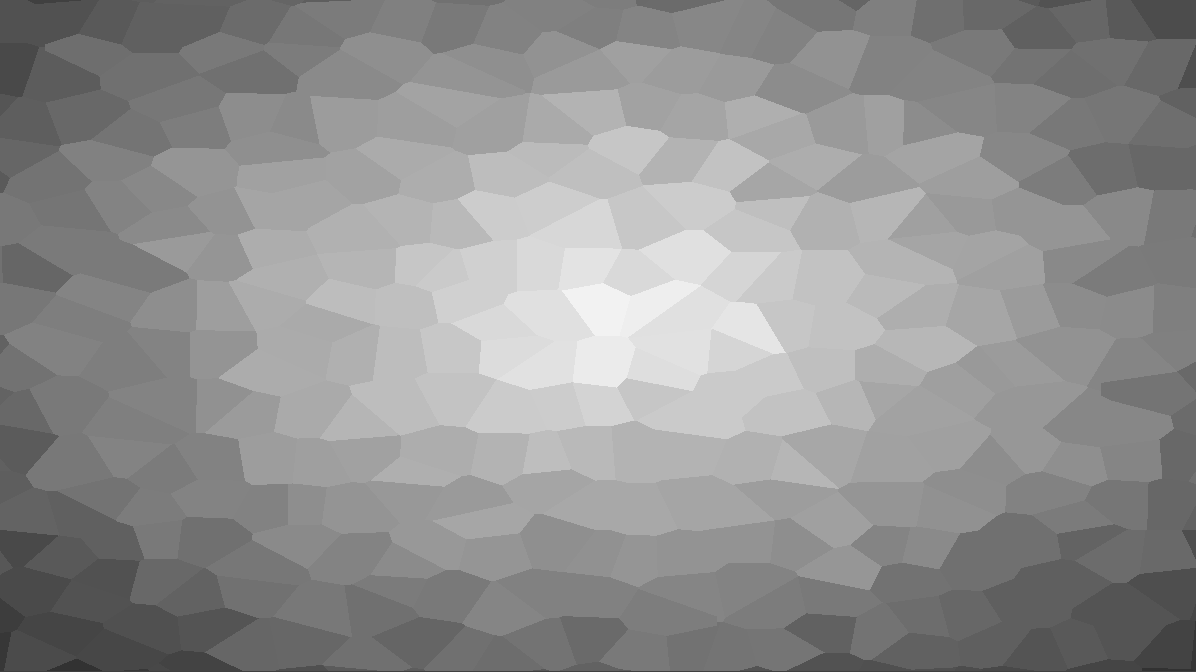
voronoi diagrams in black and white
There’s a really nice introduction to Voronoi noise in The Book Of Shaders. I think that was the first resource on that I’ve seen back when I was learning shaders. There’s also a lot of other really cool resources in there.
UV Wrapping
It’s a space distortion. Before I divide the space equally, I distort the space using a noise. Applying it to the Voronoi diagram, I get this:

distorting the space
Palette Lookup
I colored the Voronoi cells with basically the inverted distance to the center. So now, finally, I get the most appropriate color from the palette (considering they’re in the order I’d like), and apply a little bit of the shading, since I only have 7 colors in the palette:
const vec3 palette[7] = vec3[7](
	vec3(0.008, 0.451, 0.325), // #027353
	vec3(0.090, 0.275, 0.090), // #174617
	vec3(0.000, 0.455, 0.545), // #00748B
	vec3(0.949, 0.361, 0.745), // #F25CBE
	vec3(0.659, 0.580, 0.949), // #A894F2
	vec3(1.000, 0.725, 0.820), // #FFB9D1
	vec3(0.788, 0.949, 0.675)  // #C9F2AC
);

/// ...

col = palette[i] + vec3(val - .5) * .8;
That generates this:

the final look for the shader
I also move through the palette, making this popping, moving effect that I really enjoy. The final shader is available here.
The Problem
Next morning, I was working on a different computer than the one I was building the shader initially, so when I opened it to keep tweaking it, I noticed one problem:
There’s this weird stutter that wasn’t visible before. At first I was trying it on Firefox, on Windows, then I opened it on Chrome, then Edge. All the browsers displayed the same issue. So I started stripping out the effects to find where the issue was lying. Removing the UV warping, the palette cycling and making the cells bigger made the issue clearer:
Just as a comparison, that’s how it’s supposed to look like:
It seemed that the issue was in the part of the code that generated the Voronoi centers:
// get distance to all points
for (int i = -1; i <= 1; i++) {
  for (int j = -1; j <= 1; j++) {
    vec2 o = origin + (vec2(i, j) * tile_size);
    vec2 v = o * 398.0 + vec2(iTime * 1.3, iTime * 1.4);
    vec2 c = o + noise2(v) / TILES;

    float d = distance(uv, c);
    if (d < dist) {
      dist = d;
      point = o;
    }
  }
}
More specifically in the lines where I define v and c. The rule to procedurally compose the noise call, and the call itself. Somehow, something within that noise call was acting different in this computer that worked on my other computer. So I tested with these different devices:
- Two different Linux Laptops with Integrated Intel GPU: Normal
- Google Pixel 9 Pro phone: Normal
- Linux PC with an RTX 2070: Normal
- Windows PC with an RTX 4070: Broken
Out of those 5 different devices, the only one in which the stutter happened, was the last one. I even tried different browsers in pretty much all of them.
I asked some graphics programmer friends, but they were too busy to help me. So I decided to start debugging it with the tools I had in hand.
The Noise Function
Just a quick simplified introduction for those who know nothing about shader programming. A shader is a program that runs on the GPU. There are several types of shaders, depending on which part of the graphics pipeline you’re in. Shadertoy takes a Fragment Shader (otherwise known as a Pixel Shader). That’s the stage right after the GPU rasterizes the vertices of an object and then it’s this program that’s responsible for generating the final pixel colors, in summary. The programs essentially runs once per pixel, per frame, in the Shadertoy viewport. You can’t store state, so it has no side-effects. Think of functional programming: it’s like the whole shader is a pure function, it takes some inputs and will always generate the same output based on them.
That’s part of what makes Shadertoy so fun to play with. The only two parameter that ever changes in my shader are: 1. the coordinate of the current pixel; 2. the time variable. The former is passed in the form of a 2d vector, in which the components range from 0.0f to 1.0f; the latter is a float, and it only changes from frame to frame.
In order to get a random value, I have to rely on hash functions, then possibly make a procedural noise to smooth it out. The noise function I use in this shader was taken from this article on Procedural Noises, by Inigo Quilez, the creator of Shadertoy and one of the most influential graphics programmers I know. It’s slightly different from the article, but I’ve been using this same code in pretty much every shader I wrote since 2019.
Here’s the full noise code used in this shader. No need to really understand it, but it basically gets hashes of different values and interpolates them, effectively smoothing out the output. Check Inigo Quilez article if you want to understand better.
float hash1(float n) {
  return fract(n * 17.0 * fract(n * 0.3183099));
}

float noisev(in vec3 x) {
  vec3 p = floor(x);
  vec3 w = fract(x);

  vec3 u = w * w * w * (w * (w * 6.0 - 15.0) + 10.0);

  float n = p.x + 317.0 * p.y + 157.0 * p.z;

  float a = hash1(n + 0.0);
  float b = hash1(n + 1.0);
  float c = hash1(n + 317.0);
  float d = hash1(n + 318.0);
  float e = hash1(n + 157.0);
  float f = hash1(n + 158.0);
  float g = hash1(n + 474.0);
  float h = hash1(n + 475.0);

  float k0 = a;
  float k1 = b - a;
  float k2 = c - a;
  float k3 = e - a;
  float k4 = a - b - c + d;
  float k5 = a - c - e + g;
  float k6 = a - b - e + f;
  float k7 = -a + b + c - d + e - f - g + h;

  return (k0 + k1 * u.x + k2 * u.y + k3 * u.z + k4 * u.x * u.y +
          k5 * u.y * u.z + k6 * u.z * u.x + k7 * u.x * u.y * u.z);
}
First Attempt to Find the Issue
Since my friends couldn’t give me directions on to debug this, I fired off an LLM and explained the problem, along with the full code. At first it started analyzing the hash function to find some continuity problem, but I thought it was not a good idea, since this code is used in thousands of Shadertoy shaders. So I steered it away from it. Then it decided that it could be some issue with a call to fract, right in the beginning of the noise function. Apparently it found some people online complaining about a problem with it in Nvidia 40xx drivers.
fractgets the fractional part of a float.
Reading through the thinking section, I noticed that the LLM (Kimi K3) was assuming that the stuttering started after some time of the code running, which can indeed degrade the precision of the float, causing visible stutters. Pretty common thing, but in this case, it was stuttering since the very first second, but I actually decided to try the first suggestion it gave: substitute fract(x) by x - floor(x), which is mathematically equivalent.
And it worked. It fixed the issue. I didn’t see the Voronoi vertices snapping anymore. I asked for an explanation, and it gave me this:
“Root cause: Nvidia driver 595.79 (RTX 4070) miscompiles GLSL
fract()usage in this shader’s context for large-magnitude operands (~100–1000): the returned fractional part is temporally discontinuous (moves smoothly, then jumps). Proof: replacingfract(x)with the mathematically identicalx - floor(x)(already computed asp— an exact fp32 subtraction) eliminates the snapping on the affected machine while producing bit-identical output on healthy GPUs. A compiler that computes the same equation differently depending on which instructions it emits is, by definition, a miscompile. Effect on the shader:fract(v)is the interpolation weight of the value noise; when it lies, the noise output teleports instead of gliding — and the Voronoi centers (c = o + noise2(v)/TILES) teleport with it.”
At this point I could have moved on with my life. Shader was working, I could go back to tweaking it, improving the code, then publish it. But I’m too curious and I wasn’t very convinced, so I decided to dig further.
Reproducing the Issue
The natural next step is finding the minimum possible code that will reproduce the issue. So I asked the LLM, since it already had the hypothesis that generated the fix. It failed. I changed the model a couple of times, even to proprietary models like Opus, but none of them was able to create a single program that reproduced the issue.
All the test shaders it produced were based on the assumption that fract was generating garbage values for some specific range of input values, and they were variations of displaying this delta of the expected value x - floor(x) and the problematic one fract(x). The interesting outcome of these tests were that, there were either no difference at all on all my devices, or the errors were not only happening on the problematic device.
That invalidate the whole hypothesis of it being an issue with the GPU driver. LLM found a solution, but merely by chance!
Forget LLMs, Let’s Do It by Hand
I started by moving stuff around and thinking of ways to simplify the loop where I call the noise function, but keeping similar parameters. I also tried passing different values to the noise and that’s when I found out the first twist: as long as there was at least one fractional float multiplication in the parameter passed to the noise, the shader would just work normally. For example, this is the line in the original code:
vec2 v = o * 398.0 + vec2(iTime * 1.3, iTime * 1.4);
vec2 c = o + noise2(v) / TILES;
As long as I changed the scalar multiplier from 398.0 to 398.1:
vec2 v = o * 398.1 + vec2(iTime * 1.3, iTime * 1.4);
The stutter was gone. Even with the fract still in the noise code. That was the most important evidence, but also the weirdest. Even if I multiplied by 1.0, or removed the multiplication entirely, the stutter was there, but bringing it back, something like 1.001, fixed it.
Time to disassemble. I want to know what changes in the final machine code from just changing one literal float value.
Disassemblying the Shader
I don’t have a lot of experience debugging shaders, and pretty much no knowledge of GPU architecture. All my graphics knowledge was more focused on the pipeline (from trying to create 3d renderer and game engine some time ago: annileen), which happens on the graphics API side of things. But investigating issues like this is something I enjoy, and even without much knowledge of any GPU assembly, I know I can understand a lot of what’s going on by just looking at it.
Back when developing annileen, I’ve had to use some of RenderDoc, an open-source graphics debugger software that lets you dig through the whole graphics pipeline for one frame, including getting the compiled version of each shader along with all the data that went in and out of it. But I anticipated that debugging a whole browser just for one WebGL context was a bit overkill, so I invoked an LLM again to generate a shadertoy wrapper for OpenGL that run the same model of GLSL and pass the same uniforms as Shadertoy. A native program that would load shader.glsl and display it exactly like shadertoy would.
A few tokens burned and the program was running, but… no stutter. I made sure I was using the correct code, but just couldn’t reproduce the error. I assumed it was just something related to it being OpenGL and not WebGL (OpenGL ES) and discarded the test. I would have to capture a browser frame.
Capturing a Browser Frame with RenderDoc
I have a terrible habit of having multiple browsers installed with specific setups of tabs in each one of them. So I went ahead and downloaded a fresh and clean version of Chromium. I found somewhere that the correct way to launch a Chromium session for full capture in RenderDoc is using these command line parameters:
--disable-gpu-sandbox --disable-gpu-watchdog --no-sandbox --ignore-gpu-blocklist --enable-webgl --use-angle=d3d11 --disable-direct-composition
And setting it to capture also from child processes, since it creates several difference processes. After launching it and opening another wrapper I created with only the shader viewport, I could capture frames with F12 and open those captures, that are hidden in the child processes:
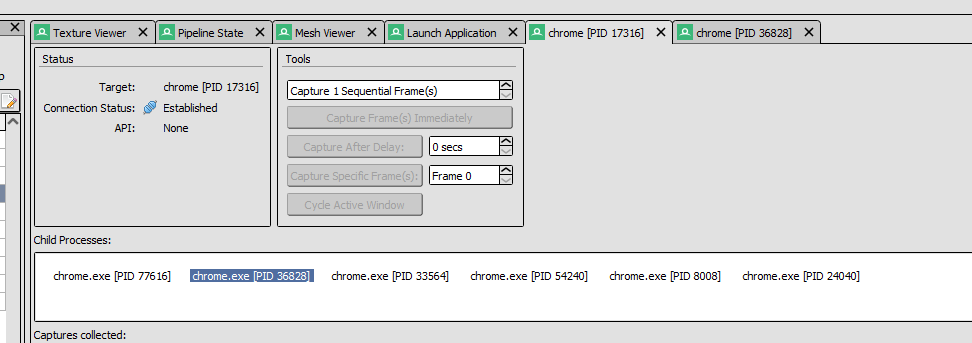
modern browsers spawn several child process
Turns out it was always within the second child process:
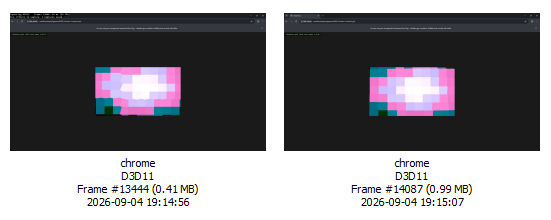
two captures I did with different values
I made two captures, one with the original shader, with that value of 398.0 value, and another one with 398.1.
To find the decompiled shader, all I needed to was to find the correct draw call in the Event Browser:
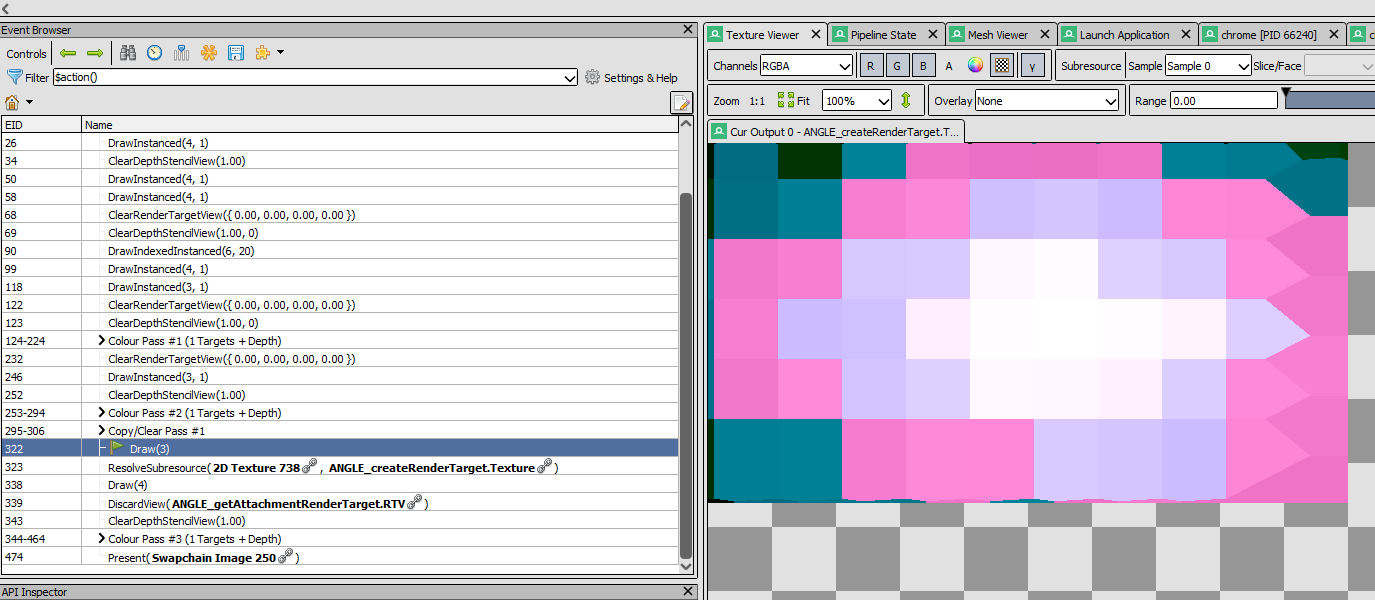
the very specific draw call when my shader is drawn
Then going to the pipeline state tab, selecting the Pixel Shader:
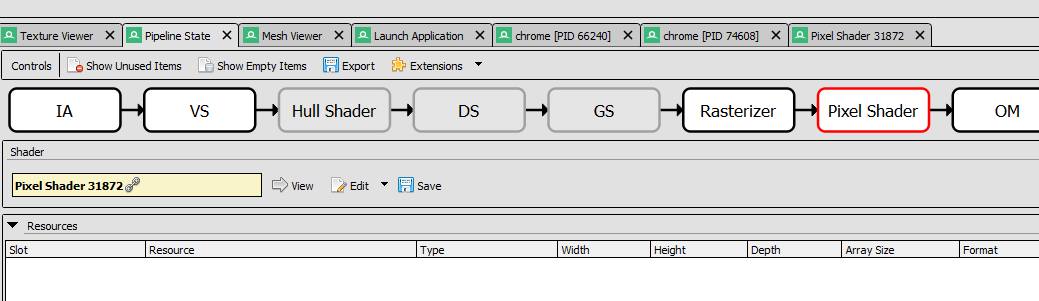
Pixel Shader 31872
Then clicking on the view button in front of the shader program:
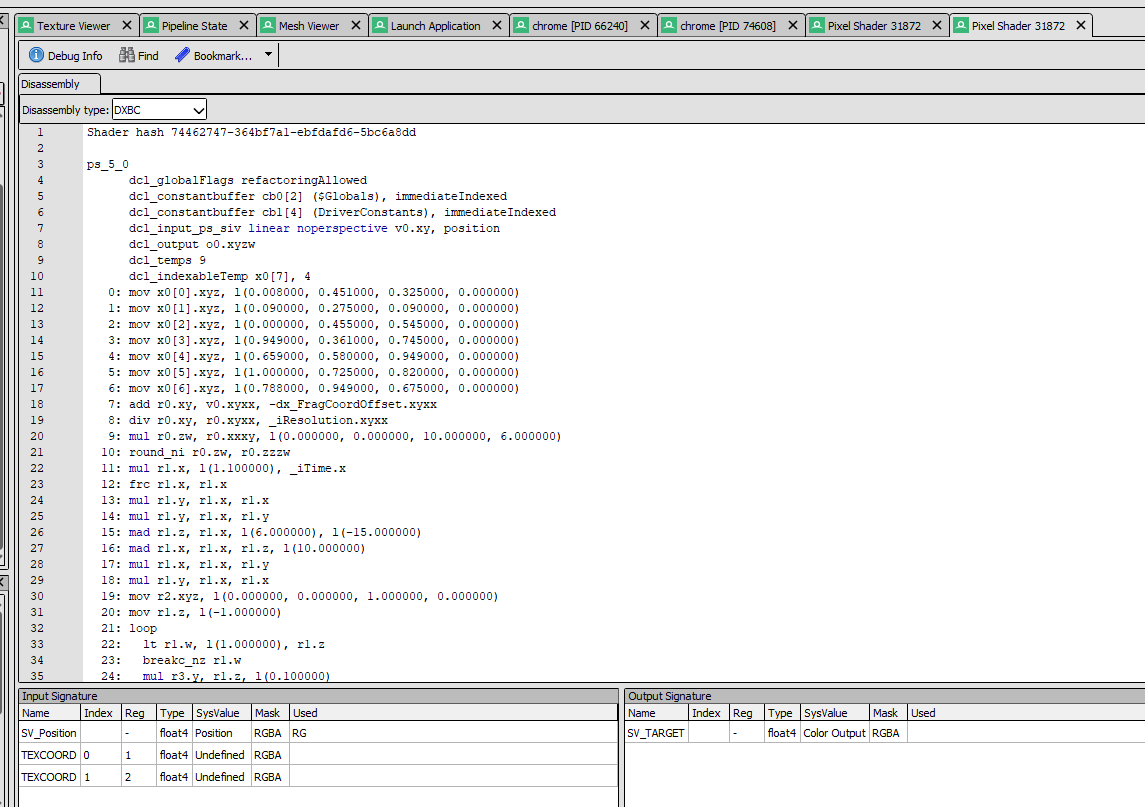
finally the shader disassembly
I missed a very important thing at this point: the fact that the shader is in ps_5_0 format. That’s the format for DirectX 11, not at all OpenGL. I’ll eventually go back to this.
I just wanted to check the difference between the two shader programs, one where that scalar multiplying the noise input was 1.0 and another one that was 1.1. And this was very surprising, the shader was very different:
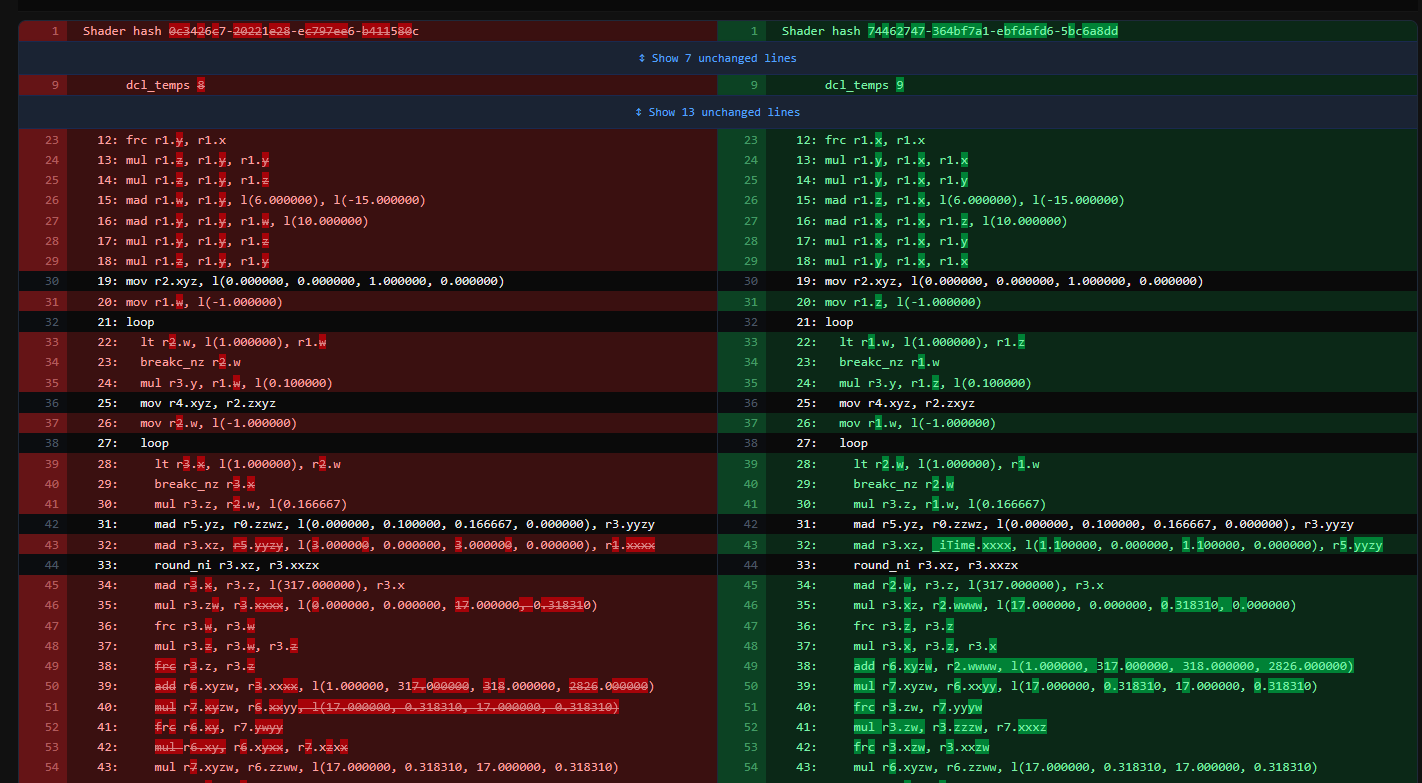
way too many changes after just a literal float value
You can see on line 43 here where the value is different. The rest is mostly different registers and instructions, although the final code had the same structure.
Just as a curiosity, I got the disassembly for the program with the x - floor(x) trick to substitute the fract, still passing a scalar value with no decimal part (3.0 in this case), and the version with fract, but passing 3.1. And it blew my mind how the two shader here were basically the same:

more aligned with my expectation
- the actual value, because in the version of the code I don’t force the fract, I’m using the regular 3.0 value
- and an
fccinstruction that becomes anadd.
The fact that changing a single literal value made a huge difference in the output code smelled to me an optimization issue. That’s when I realized the assembly was in DirectX format. Checking the browsers rendering API confirmed: it was running DirectX 11 all along. On Chrome, chrome://gpu, on Firefox: about:support. WebGL should be running OpenGL ES, I thought to myself. Then I found out about ANGLE.
ANGLE
ANGLE is a project created by Google for Chrome, that will allow WebGL to run under different graphics API, by transpiling the GLSL shaders into the respective shader languages for each API. It’s currently used not only by Chrome, but also Firefox, on Windows platforms. And turns out, the only device variable I didn’t think of so far was the OS. In all my test devices, that one was the only one running Windows.
The browser was rendering in DirectX 11, so ANGLE was transpiling the GLSL shader into HLSL, then having the DirectX compile the shader. The disassembly found in RenderDoc comes from that byte-code, DXBC (DirectX Byte Code). At that moment I remembered that the there was one flag I passed as a command line argument to Chrome to capture it in RenderDoc: --use-angle=d3d11. If I simply changed it to --use-angle=vulkan, made the whole browser be rendered in Vulkan, which made ANGLE compile the GLSL to Spirv instead. And guess… the stutter wasn’t reproducible anymore.
New hypothesis: the one extra layer of ANGLE GLSL->HLSL transpiling was optimizing that fract in a weird way based on the value passed to it!
Testing the New Hypothesis
That’s just now that I learned that we actually don’t have access to the proper GPU machine code. All we can get is the disassembly/decompilation of the byte-code generated by the graphics API’s own shader process. Then the GPU driver, which is proprietary and different for each one of the graphics cards, will compile that intermediate byte-code into their own machine code. So that assembly code I can get on RenderDoc is the farthest I can go. Which means I can’t compare the disassembly of the actual final code that’s running on the GPU from Vulkan and DirectX.
So my next idea was to find a way to intercept the intermediate HLSL code transpiled by ANGLE before it becomes DXBC. The way to do that is actually passing this command line argument to chrome: --enable-angle-features=dumpTranslatedShaders. That way, it will dump the code to the path specified to the environment variable ANGLE_SHADER_DUMP_PATH.
Surprisingly (or not), the final HLSL was nearly identical to the GLSL. No fancy optimizations or anything. In fact, the two languages are pretty similar. I remembered then when working with BGFX, it also had a pipeline to convert GLSL into HLSL for DirectX 11, and the process was very straightforward.
One more hypothesis invalidated. Next hypothesis: the issue is in the HLSL shader compiler.
Testing the HLSL Compiler
To get closer to the actual issue, I needed a proper DirectX 11 Shadertoy wrapper. So I asked an LLM to generate one for me, really quick. Then I manually transpiled the original GLSL into HLSL and I was able to reproduce the bug natively, in a Windows DirectX 11 renderer.
Since my early hypothesis that this was an optimization error, I started checking how DirectX compiles shaders. DirectX 11 uses FXC to compile the HLSL into DXBC. And when compiling it, there’s a flag to pick the level of optimization. By default, I assume that ANGLE uses O3, so that’s what I went with. When I skipped the optimization altogether, I got a working shader. It is an optimization issue.
I used HLSL Decompiler, an extension to RenderDoc to try and decompile the DXBC into working HLSL so it would be easier to check what the optimization was doing.
Considering this part of the code:
float2 v = o * 398.0 + float2(iTime * 1.1, iTime * 1.1);
float2 c = o + noise2(v) / TILES;
and considering that noise2:
// basically wraps two calls to `noisev`
float2 noise2(float2 v) {
  return float2(noisev(float3(v, 0.0)), noisev(float3(v, 18.0)));
}

// noisev starts with:
float noisev(in float3 x) {
  float3 p = floor(x);
  float3 w = frac(x);
  // (...)
Decompiling it, with no compiler optimizations at all (D3DCOMPILE_SKIP_OPTIMIZATION), generated this:
r5.zw = float2(398,398) * r5.xy;
r6.x = 1.10000002 * iTime;
r6.y = 1.10000002 * iTime;
r6.xy = r6.xy + r5.zw;
r6.xy = r6.xy;
r6.z = 0;
r6.xyz = r6.xyz;
r7.xyz = floor(r6.xyz);
r8.xyz = frac(r6.xyz);
We can see the 398 value, initializing a vec2. After multiplying it by r5.xy, which might be o from the original shader, then it’s added with the changes to the iTime. Right after, you see a call to floor and another one to frac using the values generated. Just like the beginning of the noise function.
When we turn back the optimizations on (O3), all I see is:
r3.xz = r5.yz * float2(398,398) + r1.xx;
r3.xz = floor(r3.xz);
r3.x = r3.z * 317 + r3.x;
r3.zw = float2(17,0.318309903) * r3.xx;
r3.w = frac(r3.w);
r3.z = r3.z * r3.w;
r3.z = frac(r3.z);
I see something similar, it’s assigning a multiplication of a vec2 to the 398 to r3.xz, but in the following line, it’s reassigning r3.xz to its own floor! Effectively truncating that value. So that’s where the snapping movement is generated: by truncating a value and losing its fractional part entirely.
Just to illustrate, here’s that exact part when instead of multiplying the coordinates by 398.0 I do 398.1, compiled with O3:
r4.yz = r0.zw * float2(0.100000001,0.166666672) + r2.yz;
r5.xy = r4.yz * float2(398.100006,398.100006) + r1.xx;
r5.zw = floor(r5.xy);
r5.xy = frac(r5.xy);
The whole section is completely different, just switching the value to a decimal one, but the fract call is still there. Seems like the FXC compiler is indeed optimizing away the fract call if there’s no real indication that the value passed to it is a decimal float. Although the line r5.zw = float2(398,398) * r5.xy; passes a non-decimal float, it somehow also assumes that r5.xy (or o from the original shader) contains no decimal part.
I can’t even inspect the source code for FXC because it’s a proprietary shader compiler. Luckily, the new shader compiler for DirectX 12 is open-source.
What’s Next?
At this point, I’m satisfied with my results. What was just a shader-coding night turned into a full week of shader debugging and learning. But I know there’s a lot more to be done in this case. I’d still want to get a minimum reproducible shader. If you have experience in graphics programming and want to keep investigating further, please do. Let me know if there’s any info I missed.
I didn’t even go further tweaking the shader, I think that looks pretty good and I’ll definitely work on a music video now. If you read all the way to this point and still haven’t listened to my music project, here it is: stuffy knows.